Want to make your Discord messages look spooky, mysterious, or completely glitched? Learning how to make cursed text on Discord is easier than you might think. You don’t need special software, coding knowledge, or an expensive subscription. A simple cursed text generator can turn ordinary words into distorted, eye-catching text that you can copy and paste into Discord.
Cursed text is popular among gamers, Discord community members, and content creators who enjoy customizing their online identity. You can use it for funny messages, creative display names, server nicknames, or Halloween-themed conversations.
This guide explains how cursed text works, how to create it, where you can use it on Discord, and how to keep your text readable while experimenting with different glitch effects.
Table of Contents
What Is Cursed Text on Discord?
Cursed text is a decorative writing style that makes normal letters look distorted, haunted, or glitched.
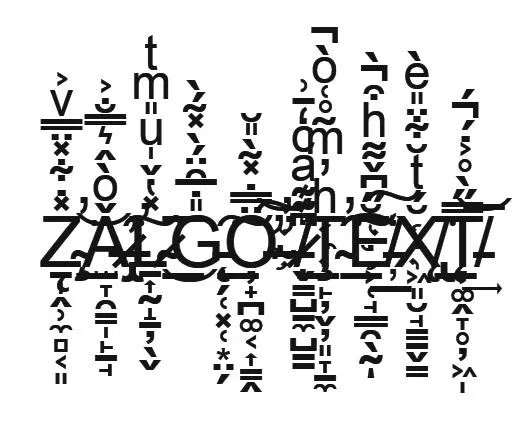
It often uses a Unicode effect called Zalgo text, which adds unusual marks above, below, and across ordinary characters.
For example:
Normal Text: Hello Discord
Cursed Text: H̷e̸l̵l̷o̶ D̴i̵s̸c̷o̶r̸d̵
The words are still recognizable, but the extra marks create a strange visual effect.
Unlike Discord’s built-in bold or italic formatting, Zalgo text uses actual Unicode characters. This means you can usually create the text outside Discord and paste it into a message without installing anything.
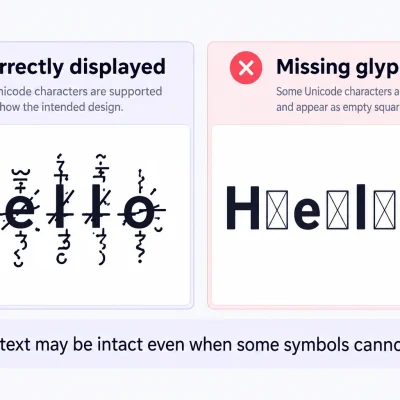
However, certain characters may display differently depending on the device, font, or application.
How to Make Cursed Text on Discord
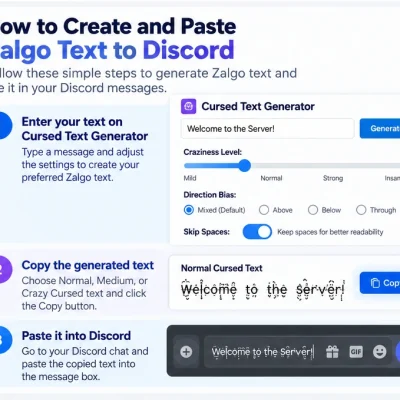
Creating Discord cursed text takes just a few steps. The simplest method is to use an online generator that automatically transforms your writing.
Step 1: Open a Cursed Text Generator
Start by visiting Cursed Text Generator.
An online generator allows you to experiment with decorative text without manually adding unusual Unicode characters.
This is especially useful when you’re creating gaming-themed messages or experimenting with different nickname ideas.
Step 2: Enter Your Text
Type the message or name you want to transform.
For example, you might enter:
- Welcome to the Dark Side
- Shadow Hunter
- Game Over
- Midnight Gaming
Short phrases often work particularly well because the effect remains noticeable without making the entire message difficult to understand.
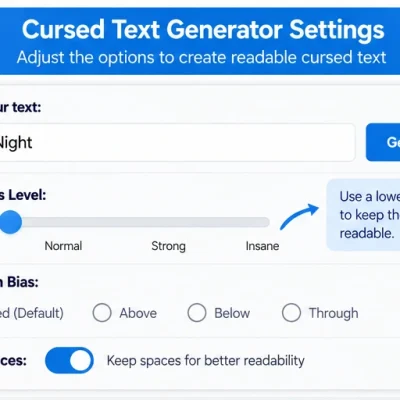
Step 3: Choose a Glitchy Style
Explore the cursed text styles available in the generator.
Some effects create subtle distortion, while others add heavier marks that make words look chaotic.
If the generator provides customization options, experiment with different levels of distortion.
A light effect may suit a display name, while a stronger effect might work for a dramatic message or horror-themed announcement.
Step 4: Copy the Generated Text
Once you’re satisfied with the result, copy the styled text.
Because the effect uses Unicode characters, the formatting is generally preserved when pasted into applications that support those characters.
Step 5: Paste It Into Discord
Open Discord, select a server channel or direct message, and paste your copied text into the message field.
Check how it appears before sending.
If the result looks too distorted, return to the generator and try a simpler style.
That’s all you need to create glitch text for Discord conversations.
How to Create Cursed Discord Display Names
Your Discord display name is one of the first things other members notice when interacting with you.
A creative name can help establish a gaming identity, match a server theme, or simply make your profile more distinctive.
Discord allows display names to include various special characters and emojis, making them a suitable place to experiment with decorative Unicode text.
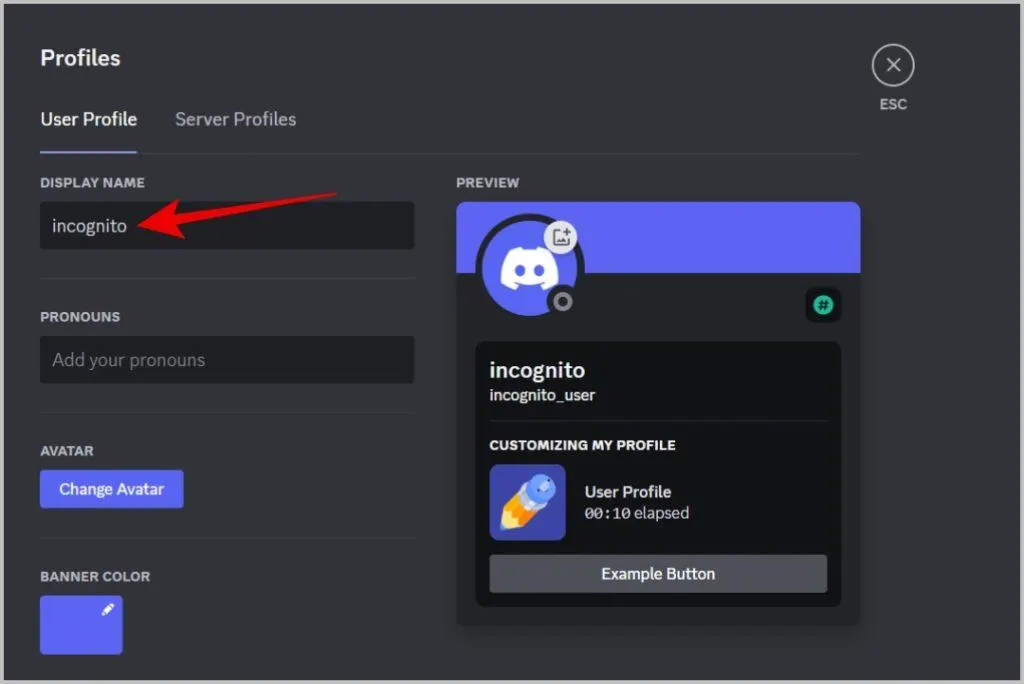
Steps to Change Your Display Name
- Open Discord and access User Settings.
- Navigate to your profile settings.
- Locate the Display Name field.
- Paste your generated cursed text.
- Save the changes.
If Discord rejects the text, try a shorter or less heavily decorated version.
Important: Discord display names and account usernames are different. Account usernames have stricter character requirements and generally cannot contain Zalgo marks or decorative Unicode letters.
Use your display name rather than your unique username when experimenting with cursed characters.
How to Make Cursed Discord Server Nicknames
Discord also supports server-specific nicknames.
These allow you to appear under a different name in an individual server without changing your primary account username.
For example, you might use a spooky nickname in a horror gaming community and a normal nickname in a professional server.
Changing Your Server Nickname
Open the server where you want to change your name.
On desktop, right-click your profile in the server’s member list and look for the option to edit your per-server profile.
Paste your chosen nickname and save it.
You can also access server-specific profile settings through Discord’s profile controls.
Keep in mind that changing your own nickname requires the appropriate server permission. If the server owner has disabled nickname changes, you may need to ask a moderator for assistance.
A short cursed nickname is generally easier to recognize than a long name covered in dozens of marks.
Best Cursed Text Ideas for Discord
Not sure what to write? Here are some creative ideas for Discord messages, nicknames, and gaming conversations.
| Normal Text | Cursed Text Example | Best Use |
| Shadow | S̷h̸a̵d̶o̷w̸ | Gaming nickname |
| Ghost | G̴h̵o̷s̶t̸ | Spooky display name |
| Game Over | G̷a̸m̵e̶ O̷v̸e̵r̶ | Gaming message |
| Welcome | W̴e̵l̷c̶o̸m̵e̷ | Server greeting |
| Dark Mode | D̷a̸r̵k̶ M̴o̵d̷e̶ | Profile theme |
| Error | E̷r̸r̵o̶r̴ | Glitch-themed message |
| Midnight | M̷i̸d̵n̶i̷g̸h̵t̶ | Aesthetic nickname |
These examples are starting points. You can experiment with your own words, gaming references, or community-related phrases.
For display names, try something short enough that other members can still recognize you.
For messages, use distortion selectively to emphasize a particular phrase.
Different Types of Glitch Text for Discord
Not all decorative Discord text looks the same.
Understanding the available styles can help you choose an effect that suits your message.
Light Cursed Text
Light cursed text adds a small amount of distortion around letters.
It works well for nicknames and short phrases because the original words remain easy to recognize.
This is a good starting point if you’re experimenting with cursed text for the first time.
Heavy Zalgo Text
Heavy Zalgo text adds more combining marks, making the writing appear dramatically corrupted.
It’s popular for horror-themed conversations, spooky storytelling, and dramatic gaming moments.
However, excessive distortion can interfere with readability, so it is better suited to occasional creative use than everyday communication.
Aesthetic Unicode Text
Some decorative styles replace ordinary letters with alternative Unicode characters rather than stacking glitch marks.
Examples include mathematical bold characters, circled letters, and fullwidth text.
These styles can create distinctive-looking names, although they are not technically the same as Zalgo text.
Can You Use Cursed Text in Discord Usernames?
This is an important distinction that many users overlook.
Discord’s unique account usernames do not support arbitrary decorative Unicode characters.
According to Discord’s official username guidelines, unique usernames are restricted to lowercase Latin letters, numbers, underscores, and periods, subject to additional rules.
Display names are more flexible and can contain a wider range of characters.
Server nicknames also provide customization options, although permissions and character restrictions still apply.
For most decorative text effects, display names, nicknames, and regular chat messages are the appropriate places to experiment.
If you’re trying to create a cursed Discord identity, start with your display name rather than your account username.
Why Do People Use Cursed Text on Discord?
Discord communities often develop their own visual styles, inside jokes, and creative traditions.
Cursed text fits naturally into that environment because it allows people to give ordinary messages an unusual appearance.
Gaming Communities
Players sometimes use glitchy messages to celebrate victories, announce defeats, or create dramatic moments during gameplay.
A simple “Game Over” message becomes more expressive when presented with a subtle distorted effect.
Horror-Themed Servers
Communities focused on horror games, paranormal stories, and spooky artwork may use Zalgo text to reinforce the atmosphere.
Decorative text can work well for fictional warnings, storytelling events, and themed conversations.
Creative Roleplay
Roleplay communities occasionally use unusual text styles to distinguish fictional characters, mysterious messages, or supernatural dialogue.
A small amount of distortion can communicate a particular atmosphere without requiring additional images.
Funny Messages and Memes
Sometimes the purpose is simply humor.
Unexpectedly distorted writing can turn an ordinary sentence into a funny visual moment, especially when used sparingly among friends.
Why Is My Cursed Text Not Working on Discord?
If your copied text doesn’t look the way you expected, several things may be happening.
Discord Rejects the Name
You may be attempting to use decorative characters in your unique account username.
Try the display name field instead.
Also check the character limit and remove excessive combining marks if necessary.
The Text Looks Different on Mobile
Some Unicode characters render differently depending on the font and operating system.
Test your text on mobile and desktop if consistent appearance matters.
Your Nickname Won’t Save
Server permissions may prevent you from changing your nickname.
A server administrator can confirm whether your role allows nickname changes.
The Message Is Difficult to Read
Heavy Zalgo effects can cause marks to overlap nearby characters or lines.
Try using a lighter style or shortening the message.
If you want to restore distorted writing to its original appearance, a compatible UnZalgo or cursed text remover can help clean the extra marks.
Tips for Using Cursed Text on Discord
Cursed text works best when it adds personality without making communication unnecessarily difficult.
Keep important messages readable, especially server rules, announcements, and instructions.
For gaming nicknames, choose a short phrase that members can still identify.
Avoid using extremely distorted text in every message because it can become distracting and may create accessibility difficulties.
Consider your server’s rules, too. Some communities discourage excessive decorative characters or disruptive message formatting.
Finally, remember that decorative display names aren’t reliable identifiers. When verifying another Discord user, check their actual account username rather than trusting the appearance of a stylized name.
Final Thoughts
Learning how to make cursed text on Discord gives you a simple way to experiment with creative nicknames, spooky messages, and distinctive profile styles.
You don’t need programming skills or complex formatting. A cursed text generator can produce decorative Unicode writing that you can copy and paste directly into supported Discord fields.
For the best experience, keep names recognizable, check your server’s permissions, and avoid excessive distortion in important messages.
Ready to create something different? Visit Cursed Text Generator, experiment with your favorite words, and find a glitchy text style that suits your Discord personality.