Want to create creepy Discord messages without turning your chat into an unreadable mess? Using Zalgo text for Discord is a simple way to add unusual glitch effects to messages, display names, and gaming conversations. The trick is choosing the right distortion level so your words remain recognizable. Zalgo text uses special Unicode marks that appear above, below, and through regular letters. These effects can make ordinary writing look corrupted or mysterious, but excessive marks sometimes create awkward spacing, overlapping lines, or problems when copying messages. In this guide, you’ll learn how to generate Discord Zalgo text, copy and paste it correctly, adjust the intensity, and fix common formatting problems without needing special software or programming knowledge.
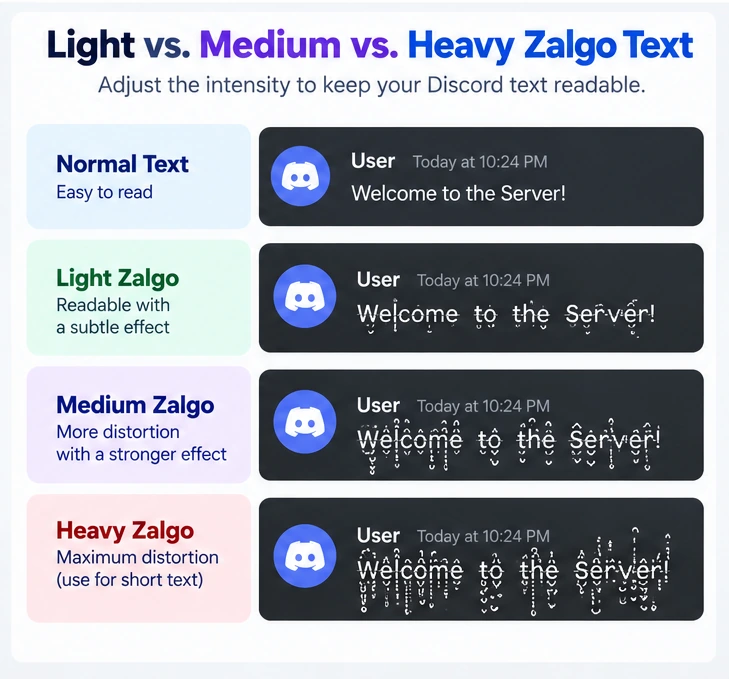
Table of Contents
What Is Zalgo Text on Discord?
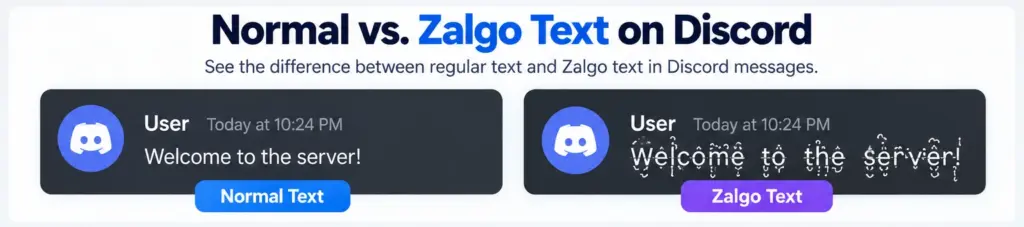
Zalgo text is a decorative writing effect that creates distorted letters using Unicode combining marks. These marks attach to ordinary characters and can appear above, below, or across them. For example, the normal phrase “Hello Discord” can become “H̷e̸l̵l̶o̷ D̸i̵s̶c̷o̸r̵d̶.”
The original words remain visible beneath the decorative characters, but their appearance changes. Unlike Discord’s built-in text formatting, Zalgo text doesn’t require a special Discord command or downloadable font. It consists of Unicode characters that can generally be copied and pasted into compatible text fields. This makes it useful for spooky gaming messages, fictional horror conversations, roleplay communities, and personalized display names.
However, not every Discord field accepts the same characters. Regular chat messages offer more flexibility than unique account usernames, which have stricter requirements.
How to Create Zalgo Text for Discord: Step-by-Step Guide
The simplest method is to use a generator that creates decorative text automatically. Instead of manually inserting unusual characters, you can type your message and select the level of distortion.
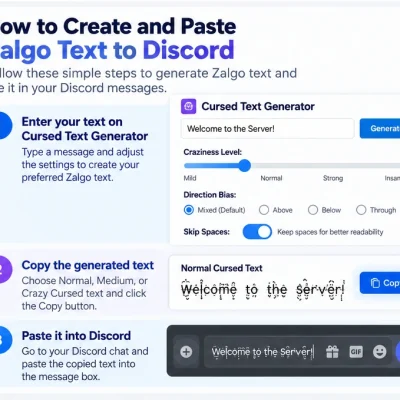
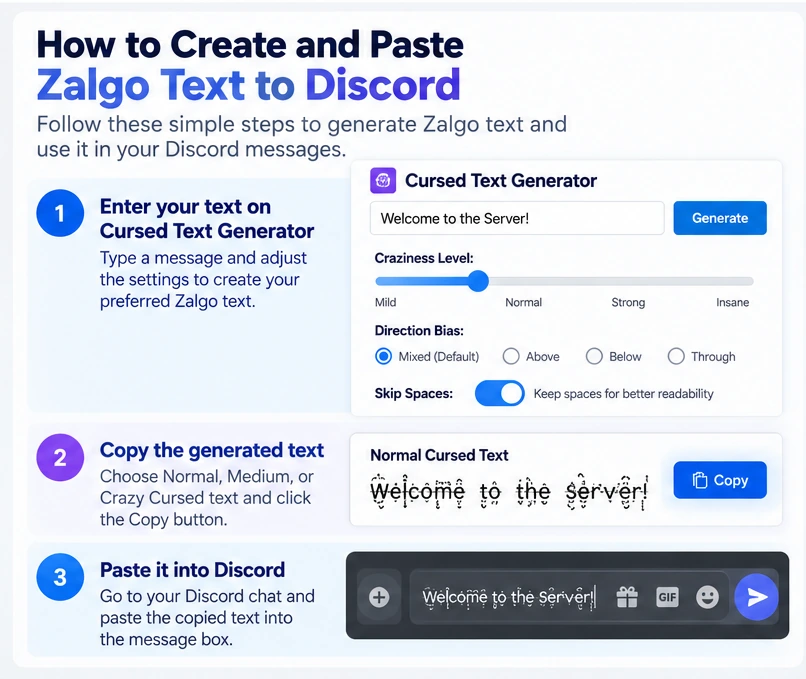
Step 1: Open the Zalgo Text Generator
Visit Cursed Text Generator in your browser.
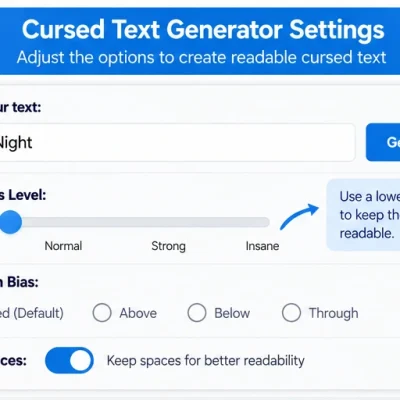
The website includes several controls for customizing cursed writing, including a Craziness Level setting, Direction Bias options, and different output intensities. These controls help you experiment with text effects before copying the result into Discord. Begin with a short phrase so you can easily compare how each style changes the original letters.
Step 2: Enter Your Discord Message
Type the message you want to transform. You might use “Welcome to the Server,” “Game Over,” “Dark Mode Activated,” or another short phrase that fits your community. Try starting with a few words instead of a long paragraph.
Short messages are easier to recognize after distortion and less likely to produce unwanted visual overlap. If you’re creating a display name, choose an even shorter phrase because Discord applies separate length restrictions to names.
Step 3: Adjust the Craziness Level
Find the Craziness Level control and move it toward Mild. This reduces the strength of the visual distortion and generally makes the text easier to read.
A lighter effect works well for ordinary conversations, while stronger effects may suit occasional horror-themed messages. If your text looks too crowded, reduce the intensity before trying another style. The objective is to preserve enough of the original lettering that other Discord members can understand the message without needing to decode it.
Step 4: Keep Spaces Readable
Your generator includes a Skip Spaces option intended to help preserve readability. Use this setting when creating sentences or multiword phrases. Clear spacing between words helps readers understand a message, even when individual letters contain decorative marks.
You can also experiment with Direction Bias to control the distribution of marks above, below, or through the writing. For everyday chat, avoid stacking too many marks vertically because they may extend into surrounding lines.
Step 5: Copy Your Preferred Output
Compare the Normal Cursed, Medium Cursed, and Crazy Cursed results. For most Discord messages, begin with Normal Cursed. Select Copy beside your preferred result. Before pasting, make sure you’ve copied the actual text rather than an image. Unicode-based Zalgo writing remains selectable text, while a generated PNG is an image and cannot function as an ordinary chat message.
Step 6: Paste Into Discord
Open Discord and select a text channel or direct message.
Paste your copied Zalgo text into the message field. Check its appearance before pressing Send. If the characters overlap excessively or the message appears difficult to understand, return to the generator and choose a lighter variation. After sending, check how the message looks in the conversation. A short test message can help you identify rendering problems before using the effect in an important community post.
Why Does Zalgo Text Break Discord Messages?
Zalgo text can make Discord messages appear broken because excessive combining marks overlap letters and surrounding text. The issue is usually visual rather than actual damage to the message.
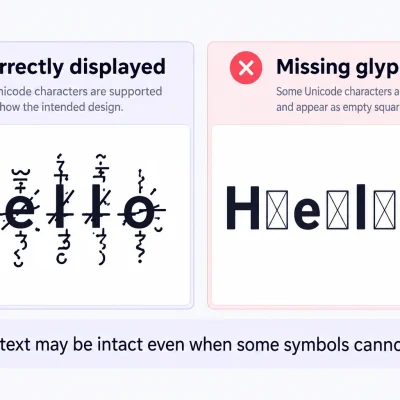
Unicode combining characters are designed to modify nearby characters. When a generator stacks many marks onto individual letters, the resulting text can extend above and below the normal line. This may interfere with neighboring messages, especially when the text uses extreme distortion.
The appearance can also change depending on the font, operating system, and device. A heavily distorted phrase may look relatively controlled on a desktop screen but become difficult to read on a smartphone. Another issue is character length. Zalgo text contains more underlying characters than the visible letters suggest. Discord’s official documentation describes a standard message character limit of 2,000 characters, with a higher limit for eligible Nitro subscribers.
A short-looking Zalgo message can therefore use more of the available limit than ordinary text. The practical solution is to keep your messages short, use fewer combining marks, and preview the result before posting.
Light vs. Heavy Zalgo Text for Discord
Different distortion levels create different visual results.
Light Zalgo text keeps the original words recognizable, making it more suitable for everyday communication.
Heavy Zalgo text creates stronger distortion but may interfere with readability.
Consider the phrase “Ghost Mode.”
Normal Text: Ghost Mode
Light Zalgo: G̷h̸o̵s̶t̷ M̸o̵d̶e̷
Medium Zalgo: G̷̍h̸͆o̵̒s̶͋t̷̓ M̸͝o̵͊d̶̍e̷̓
Heavy Zalgo: G̷̍͛͝h̸͆̓͌o̵̒͋̓s̶͋̾͝t̷̓͗͠ M̸͆̓͝o̵͊̒͌d̶̍̓͠e̷̓͗͝
These examples illustrate different levels of distortion rather than guaranteed generator outputs.
The heavier versions may work for decorative horror content, but light Zalgo is generally easier to understand in regular conversations.
How to Use Zalgo Text in Discord Display Names
Discord display names are more flexible than unique account usernames. A display name can contain a wider range of characters, making it a more suitable place to experiment with decorative Unicode writing. To change your display name, open Discord’s profile settings and locate the display name field. Paste a short Zalgo phrase and preview how it appears.
Names such as “G̷h̸o̵s̶t̷” or “S̷h̸a̵d̶o̷w̸” can create a subtle glitch appearance without requiring dozens of extra characters. Discord’s display names are limited to 32 characters, so heavily decorated text may exceed the limit unexpectedly.
Remember that an individual visible letter can contain multiple underlying Unicode characters. Discord also has an optional Nitro Display Name Styles feature with fonts, colors, and visual effects. These built-in styles are separate from externally generated Zalgo text. For a consistent appearance, check whether your selected text remains readable with the display styling applied.
Can You Use Zalgo Text in Discord Usernames?
Discord’s unique account usernames follow stricter character rules. They permit lowercase Latin letters, numbers, underscores, and periods under the platform’s username requirements. This means combining marks used in Zalgo text aren’t supported in unique account usernames. If you’re attempting to create a glitchy identity, use your display name or an eligible server nickname instead. For example, you might keep your unique username as “shadow.gamer” while using a subtly distorted version of “Shadow Gamer” as your display name. This arrangement makes your account easier to identify while still allowing creative customization.
Using Zalgo Text in Discord Server Nicknames
Server nicknames provide another way to personalize how your name appears within an individual Discord community.
For example, someone participating in a horror gaming server might prefer a mysterious nickname while keeping a regular name in other servers. Discord allows server-specific profiles and nicknames, subject to relevant permissions and restrictions. If your server permits nickname changes, access the appropriate server profile or nickname settings and paste your generated text. Use light distortion whenever possible. A nickname should remain recognizable to moderators and other community members, especially when people need to mention or identify you during discussions.
If your nickname doesn’t save, check whether your role allows nickname changes and whether the text fits the relevant character requirements.
Does Discord Markdown Affect Zalgo Text?
Discord supports Markdown formatting for features such as bold, italics, underlining, and other message styles. Zalgo text works differently because the distortion comes from Unicode combining characters rather than formatting instructions. You don’t need Markdown to create the glitch effect If a message contains both decorative Unicode characters and Markdown formatting, its final appearance may become harder to read.
For example, heavily distorted writing combined with strong visual emphasis can produce a cluttered result. For the clearest presentation, start with ordinary Zalgo text before experimenting with additional formatting. This allows you to identify whether any visual problems come from the Unicode marks or from the surrounding message layout.
How to Fix Zalgo Text That Looks Wrong in Discord
If your copied Zalgo text appears unusually distorted, start by checking the intensity of the original output. Reducing the Craziness Level often produces a cleaner result. If the writing stretches vertically, experiment with a different Direction Bias setting or reduce the number of marks.
If words appear crowded, enable the Skip Spaces option and shorten the phrase. When text looks different between devices, test a lighter version on both mobile and desktop. If Discord rejects a name, confirm that you’re editing a display name or permitted nickname rather than the unique username. For heavily distorted text you’ve already copied, an UnZalgo cleaner can help remove unwanted combining marks. After recovering the original words, generate a lighter version for Discord. Keep in mind that some combining marks are meaningful in real languages, so review cleaned text before using it.
Best Practices for Zalgo Text in Discord Communities
Decorative text works best when it adds atmosphere without interfering with communication. For example, a horror server might use a lightly distorted phrase for a fictional warning, while a gaming community might use it to celebrate a dramatic victory. However, important information should remain readable. Avoid using heavily distorted text for server rules, safety instructions, troubleshooting advice, or important announcements.
Consider accessibility as well. Screen readers may interpret unusual combining-mark sequences differently from ordinary writing. Repeatedly posting extremely distorted text can also distract other members, even when the characters are technically supported.
Moderators may establish community-specific rules about decorative messages and nicknames. Finally, use unique account usernames rather than decorated display names when verifying another person’s identity. Display names can be changed and aren’t reliable proof of who owns an account.
Frequently Asked Questions
How do I copy and paste Zalgo text into Discord?
Enter a phrase into a Zalgo text generator, choose a distortion level, copy the result, and paste it into a Discord chat message. Preview the formatting before sending.
Why does Zalgo text look broken on Discord?
Excessive Unicode combining marks can overlap letters and neighboring lines. The appearance may also vary depending on device and font rendering.
Can I use Zalgo text for my Discord name?
You can experiment with Zalgo text in supported display names and server nicknames. Discord’s unique account usernames don’t permit these decorative combining marks.
What is the best Zalgo intensity for Discord?
Light or mild distortion is usually easier to read. Heavy Zalgo is better reserved for occasional decorative phrases.
Does Discord support Zalgo text on mobile?
Discord can display many Unicode combining characters on mobile, but their appearance may differ between devices and operating systems.
Does Zalgo text count toward Discord’s message limit?
Yes. The combining marks are actual characters, so heavily decorated text can consume more of the message character limit than it appears to.
Can I remove Zalgo marks from a Discord message?
You can copy the text into an UnZalgo cleaner to recover the underlying letters. This doesn’t automatically edit the original message inside Discord.
Final Thoughts
Using Zalgo text for Discord is a creative way to personalize gaming conversations, horror-themed communities, and supported display names. The key to avoiding broken-looking messages is controlling distortion. Keep the effect light, preserve spacing, and preview the result before sending. Heavy Zalgo text can create dramatic visuals, but readable writing is usually more practical for everyday Discord communication. Try Cursed Text Generator to create your own Zalgo phrases, compare distortion levels, and copy a style that works comfortably in Discord.