Have you ever copied a message only to discover that the letters are covered with strange symbols, overlapping lines, or unusual marks? Learning how to remove Zalgo text can help you restore readable writing without manually retyping every word. The simplest method is to use an UnZalgo cleaner that removes unwanted Unicode combining marks while preserving the underlying text. Zalgo text is commonly used in memes, gaming communities, social media captions, and horror-inspired content. Although it creates an interesting visual effect, excessive distortion can make messages difficult to read, edit, or reuse. This guide explains what causes Zalgo text, how to remove it using an online cleaner, and how to handle Unicode combining marks without unnecessarily changing important characters.
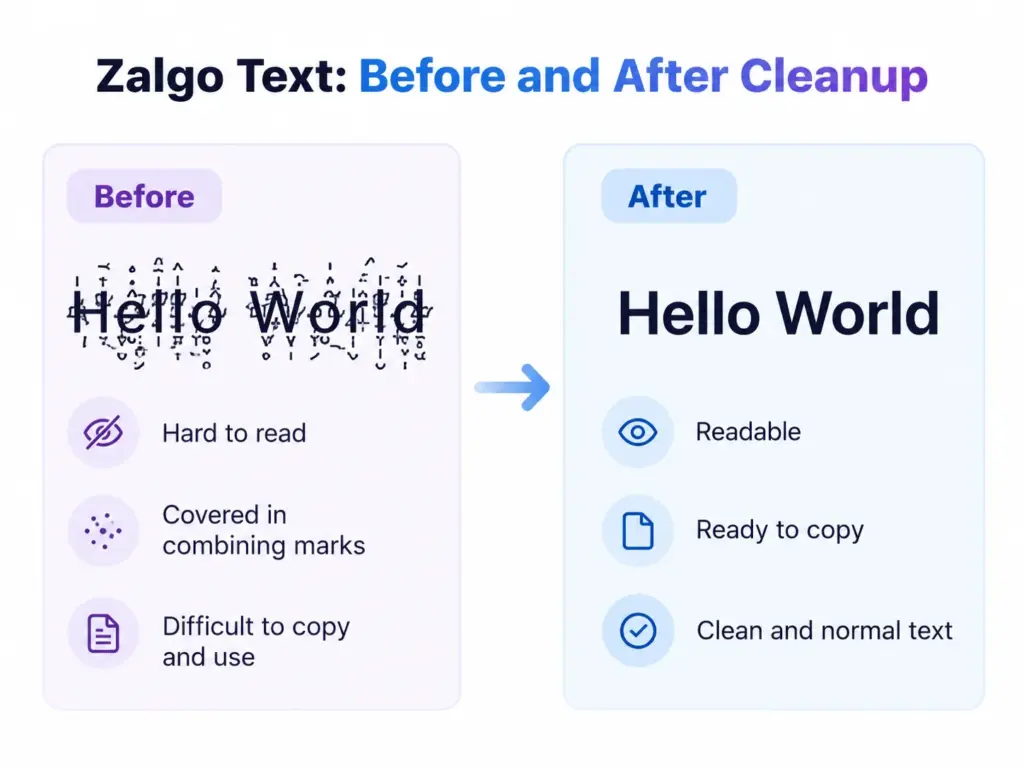
Table of Contents
What Is Zalgo Text?
Zalgo text is a decorative writing style that makes ordinary letters appear distorted by adding Unicode combining marks above, below, and through them. These marks can create the appearance of corrupted or glitchy writing. For example, the normal phrase “Hello World” can appear as “H̷e̸l̵l̶o̷ W̴o̵r̸l̷d̶” after applying a Zalgo effect.
The original letters are still present, but additional characters change their appearance. This is why Zalgo text can often be converted back into normal writing. Unlike a traditional font effect, Zalgo text is made from actual Unicode characters. Copying the text generally copies both the original letters and the combining marks attached to them. The Unicode Standard defines combining marks as characters that interact with a base character. These marks are also used legitimately in many writing systems. Zalgo generators deliberately stack them in unusual combinations to produce a chaotic visual appearance.
How to Remove Zalgo Text Online: Step-by-Step Guide
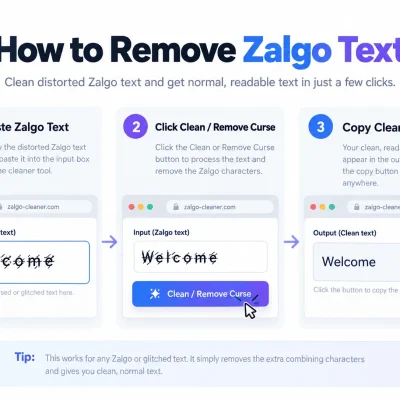
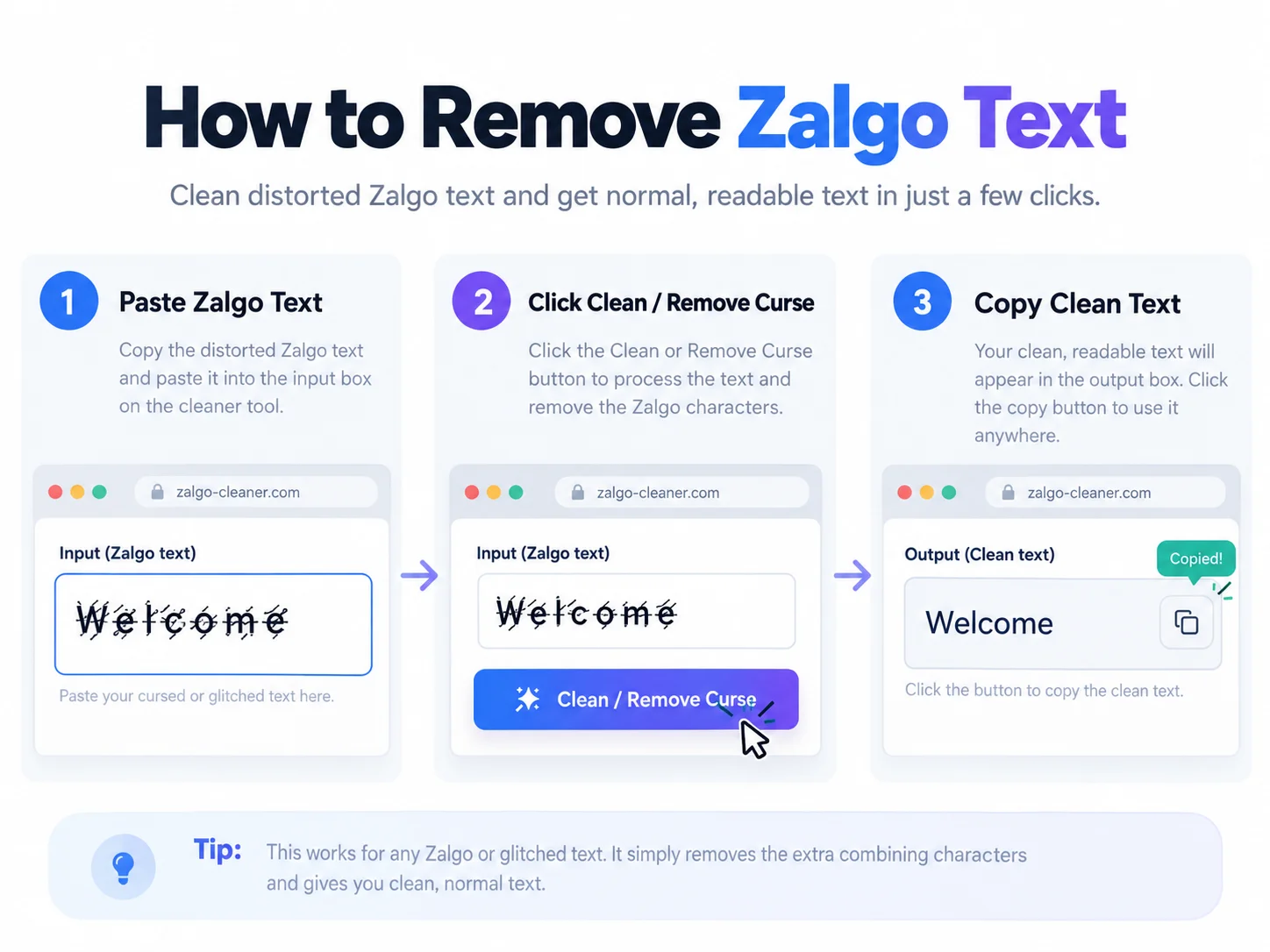
The easiest way to clean Zalgo text is to use a dedicated UnZalgo remover. This method is particularly convenient for social media messages, copied comments, gaming nicknames, and short paragraphs. You don’t need programming knowledge or additional software because the process takes place directly in your browser.
Open the UnZalgo Cleaner
Start by visiting Cursed Text Generator. The website includes an UnZalgo Cleaner designed to remove unwanted distortion from copied text. Find the section labeled “UnZalgo Cleaner” on the homepage. It contains an input field where you can paste your distorted writing and an area where the cleaned result appears. This makes it possible to handle text generation and cleanup from the same website.
Paste Your Zalgo Text
Copy the distorted text from its original source and paste it into the field labeled “Paste Cursed Text Here.” For example, you might have copied a message such as “W̷e̸l̵c̶o̷m̸e̵” from a gaming conversation or social media comment. Make sure you copy the entire phrase rather than selecting only part of it. If the original message is extremely long, consider cleaning smaller sections so you can review the output more easily.
Remove the Unicode Marks
After pasting the text, select the Clean / Remove Curse button. The tool processes the input and displays the cleaned result in its output area. For standard Zalgo text, removing the additional combining marks should reveal the underlying letters. For example, “W̷e̸l̵c̶o̷m̸e̵” becomes “Welcome.” The exact result depends on which Unicode characters were used to create the original effect.
Copy and Review the Cleaned Text
Once the text has been processed, copy the cleaned output and paste it wherever you need it. Before publishing or sending the message, compare the result with the original wording. Pay particular attention to punctuation, accented letters, numbers, and symbols. A cleanup operation may change meaningful characters if it removes marks that were part of legitimate writing. For ordinary English Zalgo messages, the process is usually straightforward. Multilingual text may require additional care.
What Are Unicode Combining Marks?
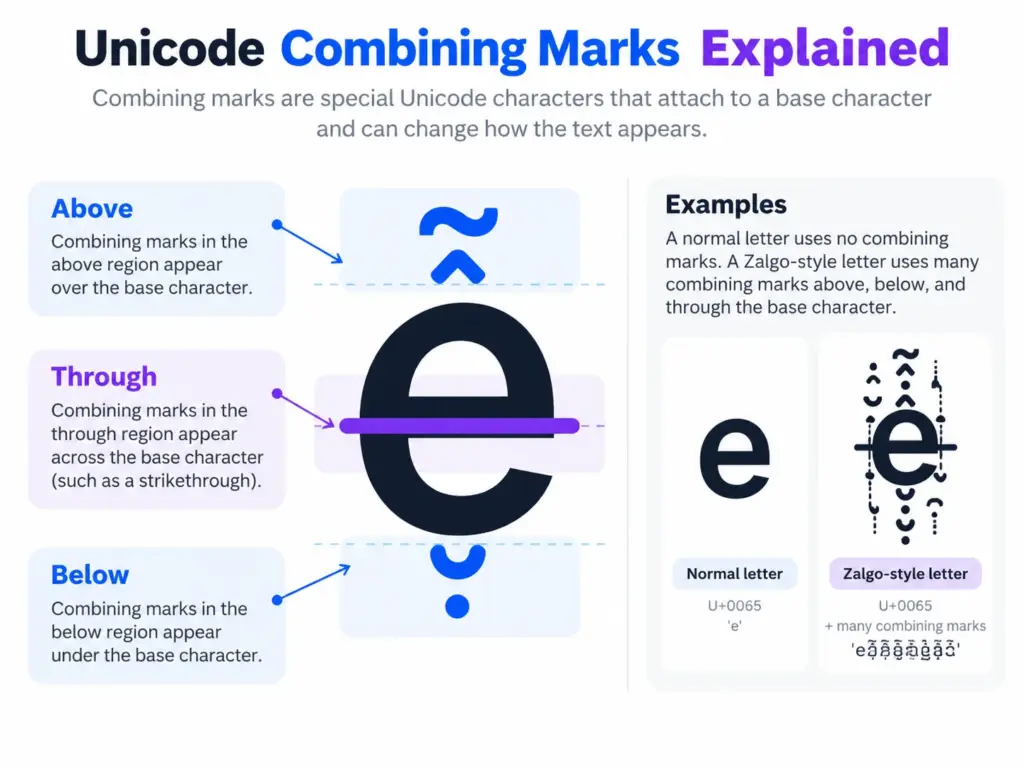
Unicode combining marks are special characters that modify the appearance of another character. They are used in many languages to represent accents, pronunciation marks, vowel signs, and other writing features. For example, the letter “e” can be combined with an acute accent to form “é.” Depending on how the text is represented, that visible character may consist of one precomposed character or a base letter followed by a combining mark.
Most readers don’t notice this distinction because modern applications display the result as a normal letter. Zalgo text takes advantage of the same underlying mechanism but uses combining marks excessively or in unusual combinations. Instead of adding one accent, a Zalgo generator may attach several marks to each letter. These marks can extend above and below the normal text line, creating a distorted appearance. Understanding this distinction is useful because removing every combining mark isn’t always appropriate. Some marks are essential to the correct spelling and pronunciation of words.
Why Does Zalgo Text Look Broken or Glitchy?
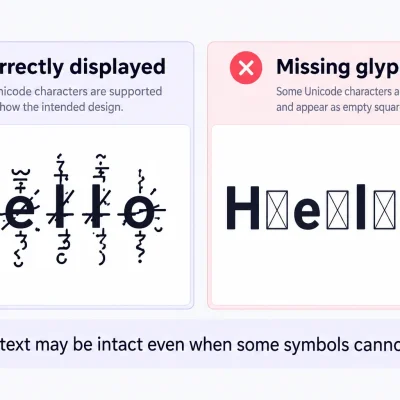
Zalgo text looks broken because multiple Unicode marks are attached to ordinary characters. Some marks appear above letters, others appear below them, and certain marks cross through the original characters. When many are stacked together, the marks can overlap neighboring lines, creating an effect that resembles corrupted digital text. The appearance can also vary between applications. A Zalgo phrase may look relatively controlled in one messaging application but appear much taller or more distorted in another. Different fonts, operating systems, and text-rendering systems handle unusual mark combinations differently. This doesn’t necessarily mean that the copied text has been damaged.
In most cases, the unusual appearance is the intended result of the combining characters. Removing those extra marks restores a simpler appearance without requiring you to change the font.
Zalgo Text Removal vs. Unicode Normalization
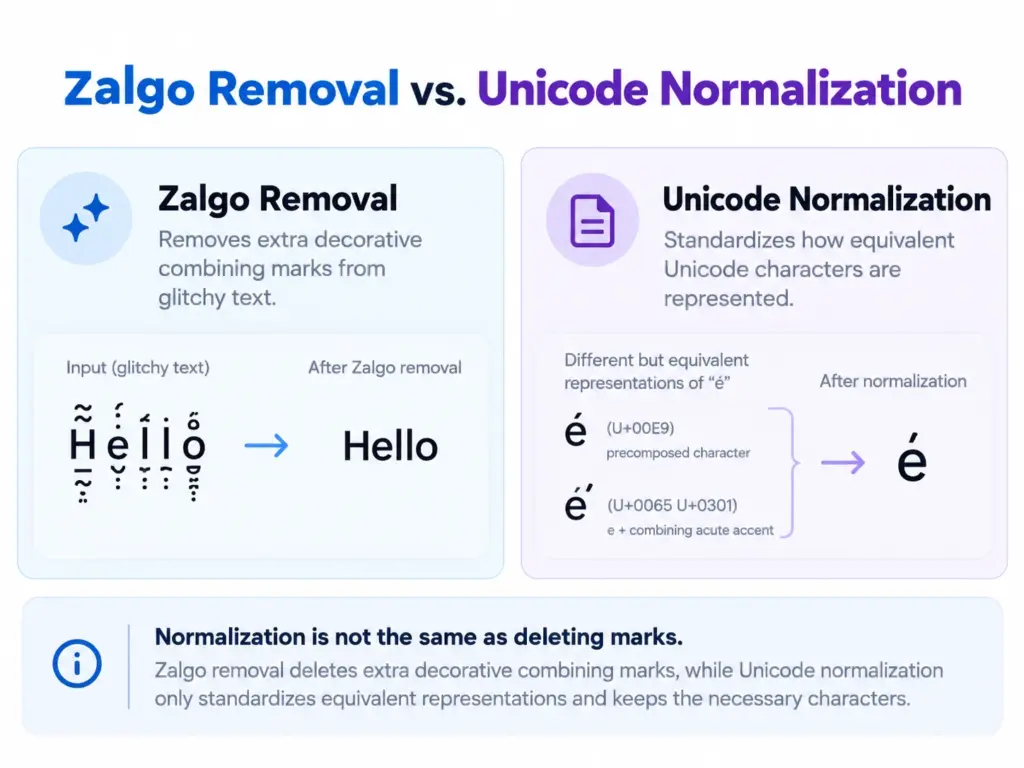
Zalgo removal and Unicode normalization are related concepts, but they serve different purposes. A Zalgo remover attempts to eliminate unwanted combining marks from decorative writing.
Unicode normalization, on the other hand, standardizes how certain characters and character sequences are represented. For example, some accented characters can be stored as a single character or as a letter followed by a combining mark. Unicode normalization can make equivalent representations consistent.
However, normalization alone doesn’t necessarily remove Zalgo distortion. A text string may still contain combining marks after it has been normalized. This is why a dedicated UnZalgo cleaner is generally more suitable when your immediate goal is to remove decorative marks. The distinction becomes particularly important when handling documents containing accented words, mathematical notation, or multilingual writing. If preserving exact spelling matters, avoid aggressive cleanup methods that remove all combining characters indiscriminately.
How to Remove Combining Marks Without Losing Important Text
When cleaning Unicode text, the goal should be to remove unwanted decoration while preserving meaningful information. Consider the word “café.” The accent is part of the word’s spelling, so removing it changes the original text.
Similarly, many writing systems use combining marks for essential linguistic purposes. Removing those marks may change pronunciation or make words incorrect. This creates an important difference between cleaning decorative Zalgo text and processing ordinary multilingual content. If you’re working with an English gaming nickname covered in glitch marks, removing the extra decoration may be relatively simple.
If you’re cleaning a multilingual document, however, review the result much more carefully. A practical approach is to save the original text, clean a short sample, and compare the output before processing the entire document. For confidential information, also consider whether an online text-cleaning service is appropriate. Avoid pasting sensitive records into unfamiliar websites without understanding how they handle data.
Common Problems When Converting Zalgo to Normal Text
Some Strange Characters Remain
Sometimes a Zalgo remover successfully removes combining marks but leaves unusual symbols behind. This happens because not every decorative character is a combining mark. Some text styles use special Unicode letters, symbols, or replacement characters that require different conversion methods. If the remaining text contains fancy alphabets rather than stacked marks, you may need a broader Unicode converter.
The Cleaned Text Loses Accents
Certain cleanup tools remove all combining marks, including legitimate accent characters. This can affect words from languages such as French, Vietnamese, and Spanish, among others. The safest solution is to review the cleaned text and restore any important accents that were removed.
The Text Still Looks Distorted
If the result remains distorted, the original message may use multiple decorative techniques. For example, someone might combine Zalgo marks with gothic Unicode letters or unusual symbols. Removing the marks would address one layer of distortion but not necessarily convert the remaining characters into ordinary letters.
The Text Looks Different After Copying
Unicode rendering can vary depending on the application and device. Even when the copied characters remain identical, their appearance may change between browsers, messaging apps, and text editors. if consistent formatting is important, preview the cleaned text in the application where you intend to use it.
Where Is an UnZalgo Text Remover Useful?
Cleaning Social Media Comments
Zalgo text frequently appears in unusual comments, memes, and decorative captions. When users want to quote or reuse these messages, the stacked marks can make editing inconvenient. An UnZalgo cleaner can help recover readable wording before copying the content into a new post or document.
Fixing Discord and Gaming Messages
Gaming communities sometimes use distorted text to create mysterious or humorous messages.
If you need to understand or document a heavily glitched message, removing its combining marks can make the original wording easier to identify.
However, decorative gaming usernames should not automatically be treated as equivalent to their cleaned versions. Their exact account identifiers may differ.
Preparing Blog and Website Content
Bloggers and website editors may encounter Zalgo text in user submissions, comments, or copied material. Unwanted combining marks can interfere with the visual presentation of an article. Cleaning the text helps maintain readability, but the final content should still be reviewed for punctuation, accuracy, and formatting.
Restoring Creative Writing
Some writers deliberately use Zalgo effects in horror stories or experimental content. Later, they may want to reuse the same passage in a conventional format. An UnZalgo cleaner can simplify that transition when the original letters remain intact underneath the decorative marks.
Can You Remove Zalgo Text Manually?
Yes, but manual cleanup is usually practical only for short passages. If a heavily glitched word remains recognizable, you can simply retype it without the unwanted marks. For example, the distorted phrase “D̷a̸r̵k̶ N̷i̸g̵h̶t̷” can be rewritten as “Dark Night.”
This method is convenient for short captions and usernames. For longer paragraphs, manually rebuilding the text becomes time-consuming. Pasting the message into a plain-text editor won’t necessarily remove Zalgo characters because Unicode combining marks are part of the text itself. A dedicated remover is generally more convenient when you need to process multiple lines.
How to Prevent Unwanted Zalgo Text Problems
The easiest way to avoid repeated cleanup is to keep an ordinary copy of your text before applying decorative effects. When creating glitchy writing for a social media post or gaming profile, save the original phrase somewhere accessible. This makes it easier to reuse the wording later without reversing the Zalgo effect.
If you’re editing website content, review copied material before publishing it. Unusual Unicode characters may remain embedded in the text even when rich-text formatting is removed. For important documents, prioritize readable writing and avoid unnecessary decorative marks.
Zalgo text can be entertaining in creative settings, but normal text is usually more suitable for instructions, professional communication, and information that needs to remain accessible.
Frequently Asked Questions
How do I remove Zalgo text quickly?
Copy the distorted writing, paste it into an UnZalgo cleaner, and select the cleanup option. Review the resulting text before copying it into another application.
What is an UnZalgo text remover?
An UnZalgo remover is a tool that attempts to restore readable text by removing the excessive Unicode combining marks associated with Zalgo effects.
Can Unicode combining marks be removed?
Yes. Combining marks can be removed using an appropriate text-cleaning tool. However, some marks are linguistically meaningful, so removing all of them may change legitimate text.
Why does Zalgo text remain after pasting into Notepad?
Plain-text editors generally preserve Unicode characters. Removing rich-text formatting doesn’t automatically delete combining marks.
Is Unicode normalization the same as Zalgo removal?
No. Normalization standardizes certain Unicode representations, while Zalgo removal focuses on deleting unwanted decorative combining marks.
Can I remove Zalgo text from Discord messages?
Yes. You can copy the message into a compatible cleaner to recover the underlying writing. This doesn’t edit the original message inside Discord.
Can Zalgo text damage my device?
Ordinary Zalgo text is Unicode writing rather than executable software. However, extremely long combining-mark sequences can create rendering or performance problems in some applications.
Final Thoughts
Understanding how to remove Zalgo text makes it easier to restore distorted messages, clean copied content, and work with unusual Unicode writing. For most standard Zalgo effects, the simplest approach is to use an UnZalgo cleaner that removes unnecessary combining marks while preserving readable letters. Remember that not every combining mark is unwanted. Accents and other language-specific marks may be essential to the original text. For a practical starting point, visit Cursed Text Generator and use its UnZalgo Cleaner to process your distorted writing. Review the output, make any necessary corrections, and copy the cleaned text wherever you need it.