Love the creepy appearance of Zalgo text but hate when the letters become impossible to understand? Learning how to make cursed text readable can help you create glitchy writing that looks mysterious without turning ordinary words into a confusing pile of symbols. The secret is controlling how many Unicode marks appear around each letter. Instead of using the strongest distortion settings, you can choose lighter effects, adjust the direction of the marks, and preserve spaces between words. This guide explains how to create readable cursed text using practical settings, examples, and techniques that work well for social media captions, gaming messages, usernames, and creative content.
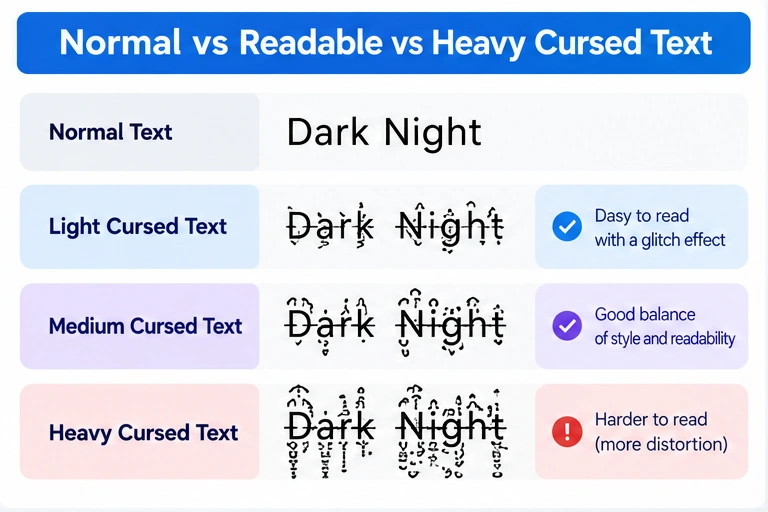
Table of Contents
What Is Readable Cursed Text?
Readable cursed text is ordinary writing with a small amount of decorative Unicode distortion added around the letters. It maintains the mysterious appearance of Zalgo text while keeping the original words easy to recognize. Traditional Zalgo writing can become heavily distorted because multiple Unicode combining marks are attached to individual characters. These marks may appear above, below, or through letters. When too many marks accumulate, the writing becomes difficult to understand. Readable cursed text uses the same underlying technique but limits the visual disruption. For example, the phrase “Dark Night” might appear as “D̷a̸r̵k̶ N̷i̸g̵h̶t̷.” The text still looks unusual, but the original letters remain visible.
This balance makes subtle glitch text especially useful when you want creative typography without sacrificing the message.
How to Make Cursed Text Readable: Step-by-Step Guide
The easiest way to create readable glitch text is to use a generator that allows you to control the strength of the effect. You can adjust the distortion until the text has the appearance you want while keeping the underlying words recognizable.
Step 1: Open a Cursed Text Generator
Start by visiting Cursed Text Generator. The website provides different cursed text styles, intensity controls, and options for adjusting how marks appear around your writing. Using these controls is more convenient than manually adding Unicode symbols to individual letters. Begin with a short phrase so you can clearly see how the selected style changes each character.
Step 2: Enter Your Original Text
Type a simple phrase into the text input. For example, you might use “Midnight Dreams,” “Ghost Mode,” or “Welcome to the Dark Side.”
Short phrases are easier to evaluate because the visual differences between light and heavy distortion become immediately noticeable. If you’re planning to use the text in a username or profile description, check the destination platform’s character restrictions before creating a heavily decorated version.
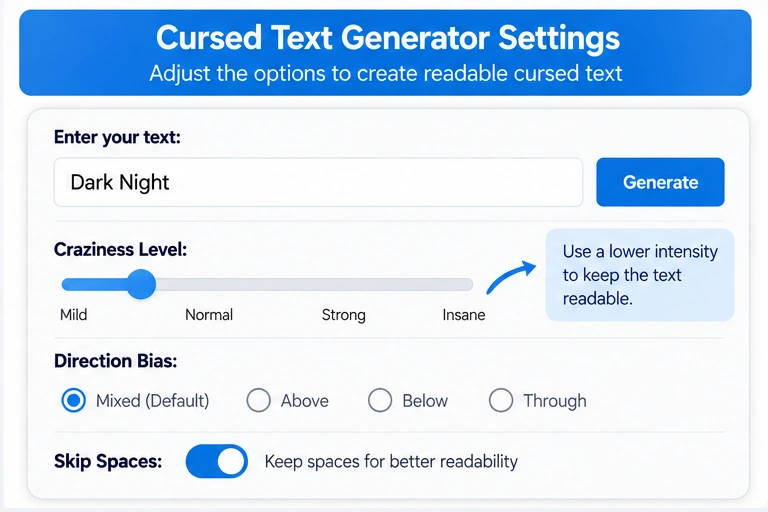
Step 3: Reduce the Craziness Level
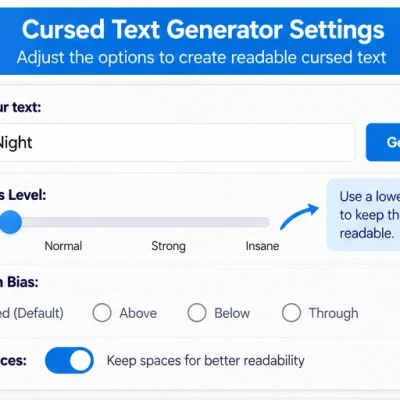
Find the Craziness Level control and move it toward the Mild end. This setting controls how strongly the generator distorts the text. Lower intensity generally produces fewer decorative marks, making the letters easier to recognize. Start with a mild effect and increase it gradually until you find a suitable balance. If the writing becomes difficult to read at a glance, return to a lighter setting.
Step 4: Compare Normal, Medium, and Crazy Cursed Text
The generator provides Normal Cursed, Medium Cursed, and Crazy Cursed result options. Compare the outputs before choosing one. Normal Cursed is generally the most useful starting point when readability matters. Medium Cursed can provide a stronger appearance for short decorative phrases, while Crazy Cursed creates much more noticeable distortion. For Instagram bios, Discord display names, and everyday messages, begin with the lighter option. Save the heaviest effects for situations where visual distortion matters more than immediate readability.
Step 5: Adjust the Direction of the Marks
Another useful feature is Direction Bias, which allows you to influence where the Unicode marks appear. Some marks extend above letters, others appear below them, and others cross through the characters. If your text looks crowded, experiment with the available direction settings.
You may find that reducing marks above and below letters produces a cleaner result while retaining a recognizable glitch effect. If the direction controls aren’t active, enable the appropriate option before adjusting them.
Step 6: Keep Spaces Between Words
Spaces help readers separate individual words. Your generator includes a Skip Spaces (keep readable) option, which is particularly useful when producing longer phrases. Enable this option to help preserve the separation between words rather than adding unnecessary distortion around spaces. For sentences, captions, and gaming messages, clear word spacing can make a noticeable difference.
Step 7: Preview and Copy Your Text
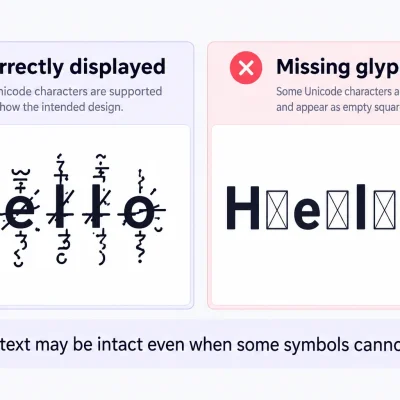
Once you’re satisfied with the result, examine the text carefully before copying it. Check whether the original letters remain recognizable and whether any marks overlap nearby words. Copy your preferred output and paste it into the application where you plan to use it. Remember that Unicode characters may render differently depending on the device, font, or application.
If the result looks too distorted after pasting, generate a lighter version and test it again.
Light vs. Medium vs. Heavy Cursed Text
The level of distortion determines how easy cursed writing is to understand.
Light styles add relatively few combining marks, while heavier styles create increasingly crowded visual effects.
| Text Style | Example | Readability | Best Use |
| Normal | Hello World | Very high | Everyday communication |
| Light Cursed | H̷e̸l̵l̶o̷ | High | Usernames, bios, captions |
| Medium Cursed | H̷̍e̸͆l̵̒l̶͋o̷̓ | Moderate | Horror posts, gaming messages |
| Heavy Cursed | H̷̍͛̐e̸͆̓͝l̵̒͋̓l̶͋̾͝o̷̓͗͠ | Lower | Decorative artwork and memes |
These examples illustrate the general difference between intensity levels. Actual generator results may vary according to the selected style and settings.
For practical communication, a lighter effect usually provides the best balance between visual interest and readability.
Why Does Cursed Text Become Difficult to Read?
Cursed text becomes difficult to read when excessive Unicode combining marks interfere with the appearance of ordinary letters. Unlike a conventional font change, these marks are additional characters attached to the original writing. The Unicode Standard supports combining marks for legitimate writing purposes, including accents and other language features.
Zalgo text uses these characters in unusually large combinations to produce its distinctive distorted appearance. When several marks are attached to a single letter, they can extend into surrounding areas and overlap nearby text. This effect becomes more noticeable when multiple lines of text are placed close together. Different devices may also render the same combinations differently, which explains why a message can look acceptable in one application but crowded in another. Reducing the number and spread of decorative marks usually helps preserve the words’ visual structure.
How to Control Cursed Text Intensity
Cursed text intensity describes how strongly decorative effects alter the appearance of the original writing. A low-intensity effect might add one or two marks to individual characters, while a heavier effect may stack several marks around each letter.
There isn’t a universal intensity setting that works equally well for every font or platform. For example, a short username displayed in large text may tolerate more decoration than a long sentence shown in a small comment field. The most practical method is to begin with the Mild setting, compare the results, and increase the distortion only when the text remains recognizable. Avoid assuming that stronger effects always produce a better design. Sometimes a single horizontal mark across a word creates more visual interest than a large collection of overlapping symbols.
Best Ways to Use Subtle Glitch Text
Social Media Bios
Social media profiles often have limited space, making readable decorative text particularly useful. A phrase such as “G̷h̸o̵s̶t̷ M̸o̵d̶e̷” can create a mysterious appearance without making the words excessively difficult to recognize. However, some platforms restrict decorative characters in account usernames. When experimenting with cursed text, check whether the field supports Unicode characters and keep essential profile information in ordinary writing.
Discord and Gaming Messages
Gaming communities often use glitched writing for spooky announcements, humorous reactions, and themed conversations. A subtle phrase can reinforce the atmosphere without forcing other players to spend time deciphering every message. For server rules, technical instructions, or important announcements, ordinary text remains the better option.
Horror Stories and Creative Writing
Writers sometimes use Zalgo text to distinguish supernatural dialogue, corrupted messages, or mysterious fictional documents. Applying the effect to a short sentence can create a strong visual contrast with the surrounding paragraphs. Using it throughout an entire story, however, may reduce readability and make the text tiring to follow.
Digital Artwork and Thumbnails
Graphic designers can use stronger glitch effects in artwork when the words are large enough to remain recognizable. For a thumbnail, poster, or promotional image, text distortion should support the design rather than hide the message. Consider previewing your design at its final display size before publishing.
How to Fix Cursed Text That’s Too Glitchy
If your cursed text has become unreadable, the easiest solution is to return to the original phrase and generate a lighter version. Reduce the Craziness Level and select Normal Cursed rather than a stronger output. If the marks extend too far above or below the letters, experiment with direction controls. For longer phrases, enable Skip Spaces to keep individual words clearly separated. If you’ve already copied heavily distorted text and no longer have the original version, you can try an UnZalgo cleaner.
Your website includes an UnZalgo Cleaner designed to remove decorative marks and recover the underlying words. After cleaning the text, you can apply a lighter cursed effect. Be aware that removing combining marks indiscriminately may also affect legitimate accents in certain languages, so review the cleaned result before reusing it.
Common Mistakes When Creating Readable Zalgo Text
A frequent mistake is using maximum distortion for every word.
While this produces a dramatic effect, it can make even short phrases difficult to recognize.
Another mistake is ignoring the destination platform. Text that looks attractive inside a generator may render differently when copied into a mobile application.
Some users also apply decorative marks to long paragraphs rather than selecting a short phrase.
This often makes the content visually crowded and harder to understand.
Finally, avoid using cursed text for important information such as contact details, instructions, or essential links.
Decorative Unicode characters may complicate copying, searching, and assistive technology interpretation.
Use them primarily for creative expression.
How to Keep Glitch Text Readable on Mobile
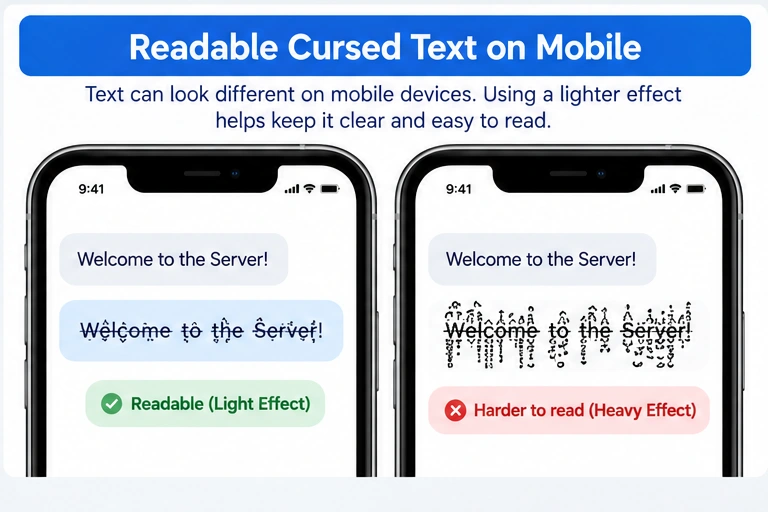
Mobile devices offer less horizontal space, making heavy decorative effects more noticeable.
A short phrase that looks acceptable on a desktop screen may wrap awkwardly on a smartphone.
To improve mobile readability, use fewer combining marks and keep phrases concise.
Avoid excessively long decorated usernames or captions.
Preview the text in the application where it will appear rather than relying exclusively on the generator’s output.
If letters overlap nearby lines or produce awkward spacing, choose a lighter variation.
Remember that the final appearance can depend on the platform’s font and rendering behavior, not just the settings used to generate the text.
Readable Cursed Text vs. Normal Text
Normal text is generally the clearest choice for communication, while readable cursed text adds a decorative effect without completely obscuring the message.
The best option depends on your purpose.
For professional emails, instructions, accessibility-sensitive content, and important website information, ordinary writing is usually more appropriate.
For creative captions, gaming communities, fictional horror messages, and decorative headlines, light cursed text may provide an interesting alternative.
If people need to search for, type, or accurately copy a name, consider providing a plain-text version as well.
Readable cursed text is a creative compromise, not a replacement for standard typography.
Frequently Asked Questions
How can I make cursed text readable?
Use a generator with intensity controls, select a mild effect, preserve spaces, and avoid excessive Unicode marks. Preview the output before copying it.
What is readable Zalgo text?
Readable Zalgo text is ordinary writing with a limited amount of Unicode distortion. It retains the original letters while adding a subtle glitch appearance.
What is the best cursed text intensity?
There is no universal best setting. Mild or light intensity generally works better for captions, display names, and longer phrases.
Can I make cursed text less glitchy without removing it completely?
Yes. Reduce the number of combining marks or regenerate the original words using a lighter style. This preserves some distortion without completely removing the effect.
Why does cursed text look different on my phone?
Different fonts, operating systems, and rendering engines may position Unicode combining marks differently. Lower intensity can help improve consistency.
Is light cursed text better for Discord?
Light cursed text is often easier to read in Discord messages and supported display-name fields. However, unique usernames have separate character restrictions.
Can I turn heavy Zalgo text into light cursed text?
Yes. You can clean the heavily distorted writing with a compatible UnZalgo tool, then generate a lighter version from the recovered words.
Final Thoughts
Learning how to make cursed text readable helps you create visually interesting writing without completely sacrificing clarity. By reducing distortion, adjusting mark direction, preserving spaces, and keeping phrases short, you can maintain the recognizable glitch effect while making the original words easier to understand. The best results usually come from experimenting with lighter settings and checking how the text appears on the platform where you intend to use it. Ready to try it yourself? Visit Cursed Text Generator, select a mild effect, and create readable cursed text that matches your preferred style.